For
more detailed information on the
code
see: C.
Bourdelle, X. Garbet, G. T. Hoang, J. Ongena, R. V. Budny, Nuclear
Fusion 42, 892 (2002)
Illustrations
of the impact of a large variety of parameters see:
slides of the training given at JET
in November 2004.
For details on the implementation of collisions see
G. Regnoli, M. Romanelli, C. Bourdelle et al, EPS 2005
Latest
updates!! 25/07/05
1.
new
publications
· impact of density peaking at different collisionalities based
on pellet injected
discharges in FTU, Michele
Romanelli et al , Physics of Plasmas 2004
· impact of the a parameter
and its role in ITB sustainement based on ITPA profiles data analysis, Clarisse
Bourdelle et
al,
Nuclear Fusion 2005
· stability
analysis of JET ITBs, Yuri Baranov et
al,
Plasma Physics and Controled Fusion 2005
· stability
analysis of JET electron ITBs, G.M.D.
Hogeweij et al, EPS 2005
2.
few upgrades in the
interfacing
tools
· Kinezero
is now interfaced in JAMS at JET, you can find here
the slides presented during the training session at JET in November 2004
3.
Large
upgrades in the
code itself
· The
collisions have been added on trapped electrons thanks to Giorgio
Regnoli, see his 2005 EPS paper for
more details
· The
model used for the mode width (w) of the trial eigenfunction has been sensibly
improved as can be seen on the figure below showing d/w versus s, for more details read the
note.

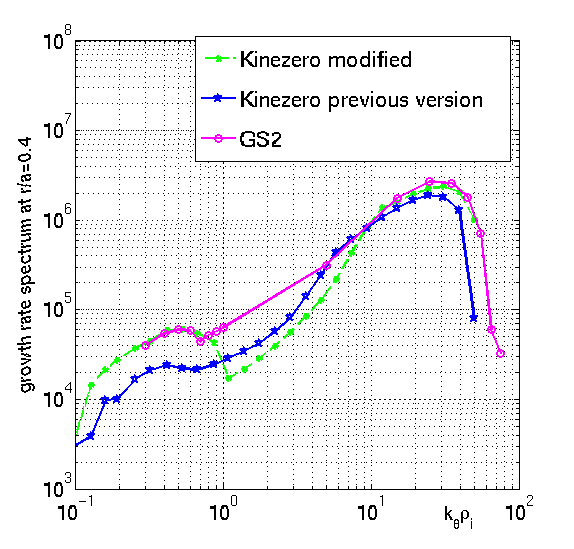
· As
can be seen on the comparison between Kinezero and GS2 shown in the
mode width discussion, Kinezero gives lower growth rates than GS2. This
difference is due to the way the bounce average of the trapped particles is
treated in both codes. Kinezero
simplified
way of accounting for both the finite Larmor radius effects and for bounce
average has now been modified in order to match better the more exact GS2
approach. Previous qualitative behaviours of the growth rates are not affected,
but their absolute values are now higher and the shape of the spectra is
slightly modified. More details in the note here.
click
here to view former updates,
05/03/04
Coming updates :
None
forseen at the moment, but suggestions and good will are welcome!
***
*** *** ***
To
make an input file you have multiple choices, or you make it from your own
data, or you read the ITPA profile database, or you make it using the Jams
interface at
JET :
1.
To prepare an input
file with your own experimental data but this way of working is quite artisanal
and not appropriate to do runs based on experimental data, it is always better
to work from JETTO or so output:
·
create
a kinezero directory
·
download
prepkize.m or from the JAC at JET copy ~cbourde/kinezero/kizecollflr/prepkize.m
·
create
a matlab file called datajet_11111_030.mat, where 11111 stands for the shot
number and 030 stands for a time label such that 3s is 030, 42.34 s gives 423
and 42.36 gives 424. The file has to include :
-
B
: the magnetic field in T
-
a
: the minor radius in m
-
R
: the major radius in m
-
x
: the normalized flux surface label (ideally the normalized sqrt of the toroidal
flux, or r/a)
-
te
: the electron temperature in keV at each x
-
ti
: the ion temperature in keV at each x
-
ne
: the electron density in units of 10^19 m^-3 (ie for 4.10^19 m^-3 should be ne
= 4)
-
q
: the security factor at each x
-
zeff
: the effective charge at each x a little smoothing of the profile is advised,
otherwise you will have grad(X)/X that will jump around a bit too much, of
course the big features have to be kept, so it is a delicate exercise.
·
then
go in matlab and run prepkize.m, it will read the datajet file you just made,
and calculate the gradients, the Larmor radii and so on. It is plotting the
profiles and the associated grad(X)/X so that you can check if the smoothing was
correct. For
example, in an ITB, check that grad(X)/X peaks at the barrier location, or on
the contrary if grad(X)/X looks very noisy, then the smoothing might have been
too light leading to misleading variations of the gradients.
You will also have a plot of the electron collision frequencies compared to the
electron vertical drift, nwge,
for the minimum n and for n at kqri = 2, which
corresponds more or less to to upper limit of the TEM range.
·
the
file containing all the needed information to run Kinezero is saved in the
current directory, it is called basekinezero_11111_030.mat, where 11111 is the
shot number and 030 is the time label such that 3s is 030, 42.34 s gives 423 and
42.36 gives 424.
2.
From the ITPA database
You just need
to know the tree name ('jet', 'itb_tftr', etc), the shot number you are
interested in and at what time. This program reads data from the
ITPA profile database.
·
create
a kinezero directory
·
download
mdskize.m or copy
from the JAC at JET ~cbourde/kinezero/kizecollflr/mdskize.m
·
then
go into matlab and run mdskize.m. It will pick up from the profile database the
following data: Btor, a, R, and the q, Te, Ti,
ne and Zeff profiles. It plots the profiles so that you
can make sure that it is what you want to analyze. Then it calculates the
gradients, Larmor radii and so on it will need in Kinezero. It plots the
profiles and the associated grad(X)/X so that you can check if the smoothing was
appropriate. For example, in an ITB, check that grad(X)/X peaks at the barrier
location, or on the contrary if grad(X)/X looks very noisy, then the smoothing
might have been too light leading to misleading variations of the gradients.
You will also have a plot of the electron collision frequencies compared to the
electron vertical drift, nwge,
for the minimum n and for n at kqri = 2, which
corresponds more or less to to upper limit of the TEM range.
·
the
file containing all the needed information to run Kinezero is saved in the
current directory, it is called basekinezero_11111_030.mat, where 11111 is the
shot number and 030 is the time label such that 3s is 030, 42.34 s gives 423 and
42.36 gives 424.
3.
Input from the JETTO
output from the JAC machines at JET:
You just need to know which shot
number you are interested in and at what time. This program reads JETTO output, so you need to give
the JETTO run user ID and sequence number of the shot you want to analyze.
·
create
a kinezero directory
·
download
jettokize.m or from the JAC at JET copy
~cbourde/kinezero/kizecollflr/jettokize.m
·
then
go into matlab and run jettokize.m. It will pick up the JETTO Btor, a, R, and
the q, Te, Ti, ne and Zeff profiles. It plots the profiles so that you can make
sure that it is what you want to analyze. Then it calculates the gradients,
Larmor radii and so on it will need in KINEZERO. It plots the profiles and the
associated grad(X)/X so that you can check if the smoothing was appropriate. For
example, in an ITB, check that grad(X)/X peaks at the barrier location, or on
the contrary if grad(X)/X looks very noisy, then the smoothing might have been
too light leading to misleading variations of the gradients. You will also have
a plot of the electron collision frequencies compared to the electron vertical
drift, nwge,
for the minimum n and for n at kqri = 2, which
corresponds more or less to to upper limit of the TEM range.
·
the
file containing all the needed information to run Kinezero is saved in the
current directory, it is called basekinezero_11111_030.mat, where 11111 is the
shot number and 030 is the time label such that 3s is 030, 42.34 s gives 423 and
42.36 gives 424.
To run Kinezero
·
download
kizecollflr.targz, then in unix: cp kizecollflr.targz kizecollflr.tar.gz and gunzip
kizecollflr.targz and tar
-xvf kizecollflr.tar. In the makefile, correct
if necessary the links to the following libraries :
libnag.a and libmat.so. Or copy from the JAC at JET in your kinezero directory
~cbourde/kinezero/kizecollflr/*.f90, makefile, *.a, *.m, kinezero.cmd
·
type "make", now the
executable of Kinezero is ready
·
then addapt the kinezero.cmd batch
file by: changing 11111 by the shot number, 030 by your time label, change also
"cbourde" by your own user name, make sure the directory you are
sending the output is correct and set your e-mail address so that
you will recieve an e-mail when the run has completed. If you want to send many
jobs at the same time, save kinezero.cmd with a
different label, for example kize_11111_031.cmd.
·
then type: llsubmit kize_11111_030.cmd
- to check if your job is running do : xloadl & then wait for the e-mail
that will tell you when it is completed. If your local batch system is
different from the JAC system at JET, adapt this ".cmd" file and the
submition command following the recommandations of your system manager.